

Chapters
Browse all chapters
AI features
You can ask AI to write a page, rewrite a section or restyle a word in three places: inside the editor, in webmarlin.ai, and from Claude or ChatGPT connected to your account. All of them follow your site's AI brief and write drafts you review before publishing.
Where AI helps
| Where | Best for | How to open it |
|---|---|---|
| Compose with AI (editor) | Writing a whole page from one sentence | Generate this page with AI on an empty page, or the round sparkle button at the bottom right of the canvas |
| Edit with AI (editor) | Changing one section: wording, tone, colours, layout | The sparkle on a selected section, or Change with AI in the section menu |
| webmarlin.ai | Chatting about the whole site while watching it change | Ask AI in the top bar |
| Claude or ChatGPT (MCP) | Working from the AI app you already use | Connect once, then ask in plain words |
AI work uses credits; your balance is in the top bar. Click it to open Account → AI Credits: free credits reset monthly, purchased credits never expire, and credit packs can be bought there.
Compose a page
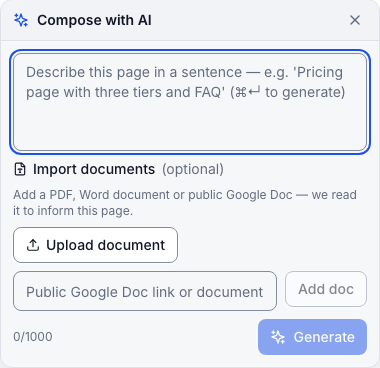
- Open an empty page (or any page) and press the sparkle button.
- Describe the page in a sentence, for example "Cake price list with three sizes, what's included, and a FAQ about ordering."
- Optionally add a PDF, a Word document or a public Google Doc for the AI to read, such as your price sheet.
- Press Generate (or ⌘+Enter). The page is written into the draft; review it, then Save and Publish.
Edit one section
Select a section, click the sparkle, and say what to change. Apply (or Cmd+Enter) runs it; the result lands in the draft so you can undo or discard.
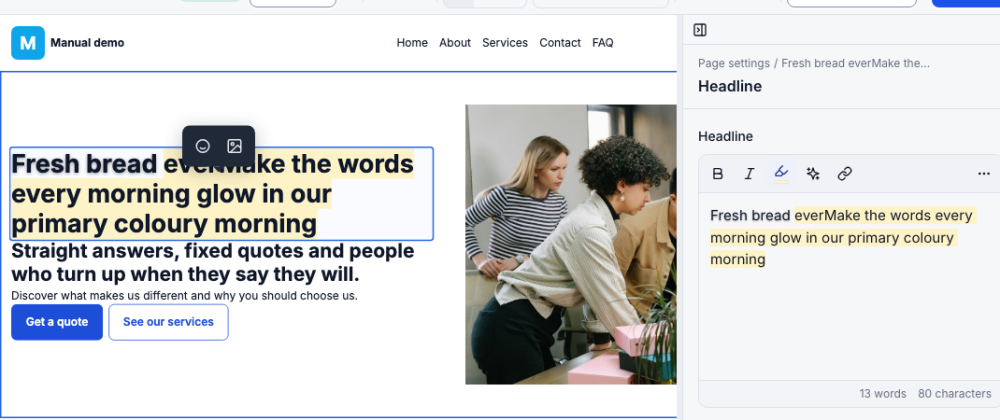
Good requests are specific: "Change the heading to Welcome", "make this section darker", "shorten the text to two sentences", "make the words every morning glow". To change one word's look, select it first; the AI then styles exactly that element and checks the change really shows before it says it is done.
webmarlin.ai
Ask AI opens webmarlin.ai in a new tab, already signed in and on the site you were editing. On the left is your live site; on the right, the chat.

- Type what you want: "Add opening hours to the footer", "Write a blog post about our Easter hot cross buns", "Make the header sticky."
- Click something on the page first to point at it, then ask about "this".
- Pages and Switch website at the top move between pages and sites; Chats keeps earlier conversations; Webmarlin returns to the console.
- Header, footer and partials can be edited here too, with the same "changes apply to every page" banner.
What AI can and cannot change
- AI follows the AI brief in Settings → General literally: voice, audience, language, and your Always and Never lists.
- AI edits go into the page's draft. If you have the page open, the editor says This page's draft was updated outside the editor (AI or MCP); review before saving.
- Write protection stops AI (and people) from changing a page or shared block. Turn it on with the lock icon in Pages, or ask the assistant to lock a page. A locked page shows This page is write-protected. Unlock to edit.
- Team members can use AI only with the AI tools permission, and it spends the owner's credits.